
About Rob Run Fec
- Supports Windows 10 & Windows 11 (All Versions Up to 26H2)
- Supported [Intel/Amd Both]
- Support Steam
Features:
Aim Assist
- Enabled - Enable or disable Aim Assist.
- Vectored Aim - Turn the camera toward the selected target.
- Silent Aim - Change shot direction without changing camera direction.
- Movement Prediction - Predict moving target positions using their velocity and position updates.
- Spread Prediction - Compensate for predicted weapon spread when using Vectored Aim.
- No Spread (Silent Aim) - Compensate for predicted single-ray weapon spread.
- At Shoot - Activate aiming while the fire button is held.
- Visible Only - Select aim points with a clear line of sight.
- Enemy Only - Exclude teammates, including party and clan members.
- Vertical Aim Speed - Adjust vertical aiming speed separately.
- Horizontal Aim Speed - Adjust horizontal aiming speed separately.
- FOV - Limit the target search angle relative to the current view.
- Draw FOV - Display the aiming field-of-view circle.
- Target Switch Delay - Configure the delay before switching targets.
- Nearest Coefficient - Adjust how body-part priorities affect aim-point selection.
- Maximum Distance - Limit aiming distance based on the current weapon's range.
- Ignore Knocked - Exclude knocked-down players.
- Include NPCs - Allow aiming at NPCs.
- Aim Keys - Configure two hold keys for activation.
- Toggle Key - Assign a key to toggle Aim Assist on or off.
- Hitbox Priority Key - Give selected hitboxes greater priority while held.
- Hitbox Priorities - Configure priorities for the head, neck, torso, arms and legs.
- Hand Aim Point - Adjust aim points on the final arm bones to improve hit registration.
Visuals
- Players ESP - Enable or disable visual features.
- Enemy Only - Display enemies only, excluding party and clan members.
- Box - Display a 2D box around players.
- Box Outline - Add an additional outline around player boxes.
- Skeleton - Display player skeletons.
- Skeleton Thickness - Adjust skeleton line thickness.
- Maximum Distance - Set the maximum player display distance.
- Maximum Corpse Distance - Set a separate display distance for dead players.
- Corpses ESP - Display dead players when model data is available.
- Nickname - Display player nicknames.
- Distance - Display the distance to players.
- Held Item - Display the weapon or item held by players.
- Aiming at You - Display a blinking tag when a player is aiming at you.
- Reloading Tag - Display a blinking reload tag beside the held-item name.
- Role Visibility Colors - Configure separate visible and hidden colors for cops, robbers and civilians.
- Enemy / Team ESP Colors - Customize box, skeleton and label colors for enemies and teammates, including visibility and death states.
- Player Glow - Add an outline glow around player models.
- Players Chams - Choose between Disabled, Flat, Material, Flat Pulse or Material Pulse.
- Projectile ESP - Display grenades in a dedicated Visuals subtab.
- NPC ESP - Display in-game NPCs.
- Objects ESP - Display world objects.
- Items ESP - Display loot items.
- Cars ESP - Display cars.
- Bases ESP - Display available settlement bases.
Misc
- Invisible Opacity - Adjust the opacity of hidden ESP objects.
- No-Recoil - Disable weapon recoil.
- Auto Pistol - Automatically fire semi-automatic pistols while holding the fire button.
- Triggerbot - Automatically fire when the crosshair is positioned over a valid target.
- Radar - Display a separate on-screen radar.
- HUD - Display a movable information panel.
- Player List - Display a movable table of players on the server.
- Free Camera Enabled - Enable or disable Free Camera.
- Screen Protection - Hide the overlay from supported screen-capture methods.
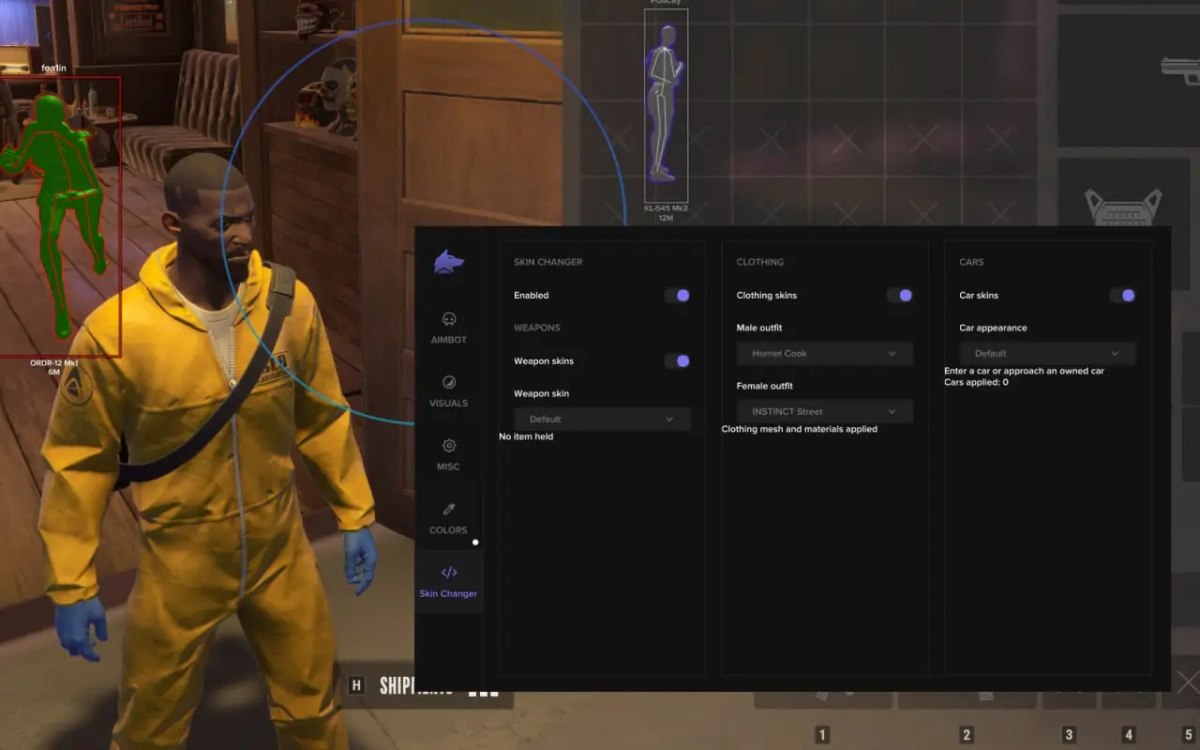
- Skin Changer - Enable or disable local appearance changes.
[MENU]

[SCREENSHOT]


